
Appearance
ActualLab.Rpc and Distributed Compute Services
Fusion is designed with distributed applications in mind, and one of its key features is the ability to expose Compute Services over the network via ActualLab.Rpc and consume such services via Compute Service Clients.
What is ActualLab.Rpc?
ActualLab.Rpc is a high-performance RPC framework for .NET that provides a way to call methods on remote services as if they were local. It uses WebSockets as low-level transport, but it's built to run on top of nearly any packet-based or streaming protocol, so it will support WebTransport in the near future.
It is designed to be fast, efficient, and extensible enough to support Fusion's Remote Compute Service scenario.
If you want to learn more about ActualLab.Rpc performance, check out this video: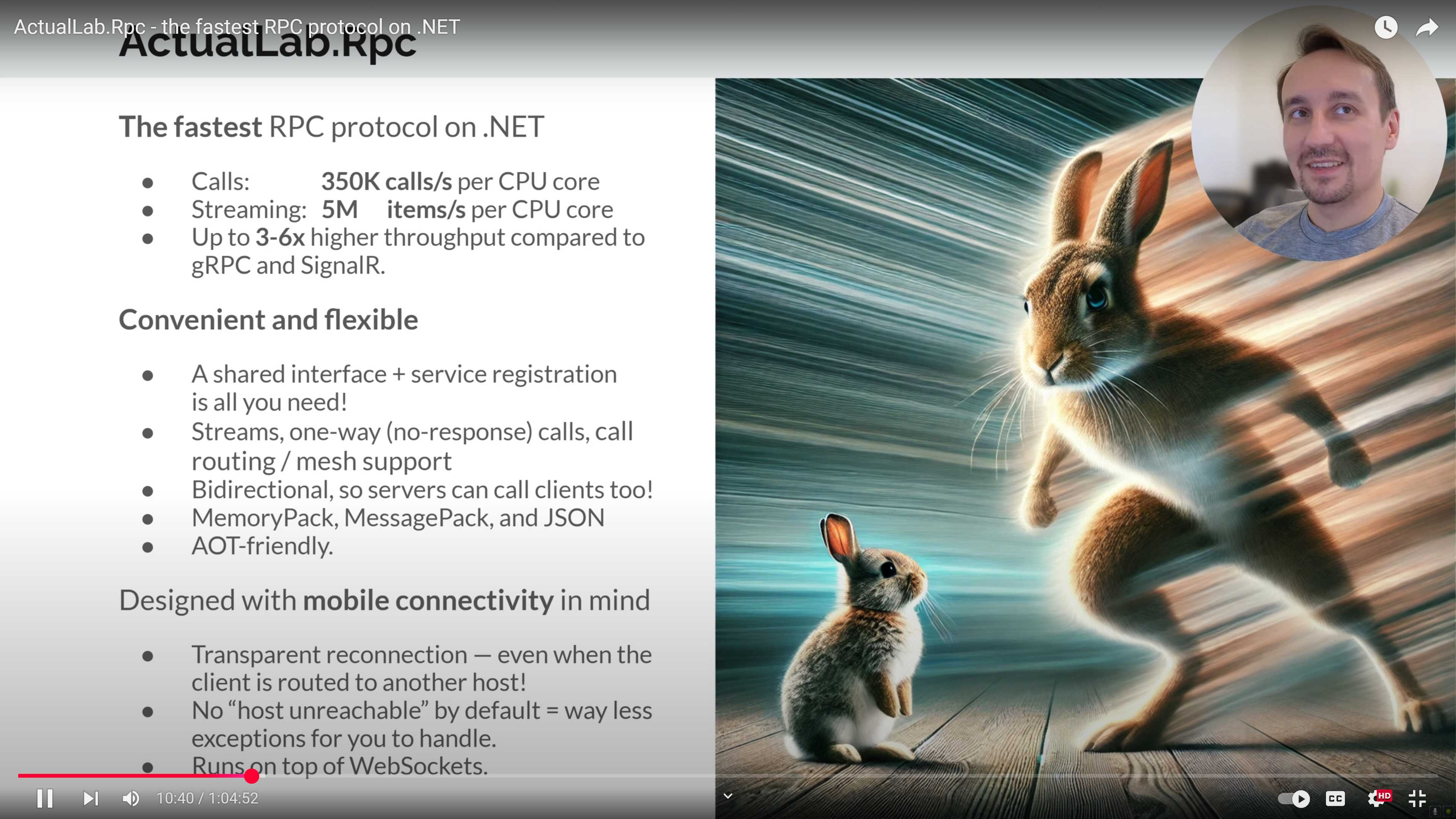
What is Compute Service Client?
Compute Service Clients are remote (client-side) proxies for Compute Services built on top of the ActualLab.Rpc infrastructure. They take the behavior of Computed<T> into account to be significantly more efficient than equivalent plain RPC clients:
Consistent Behavior: They back the result of any call with
Computed<T>that mimics the matchingComputed<T>on the server side. This means client-side proxies can be used in other client-side Compute Services, and invalidation of a server-side dependency will trigger invalidation of its client-side replica.Efficient Caching: They cache consistent
Computed<T>replicas, and they won't make a remote call when a consistent replica is still available. This provides exactly the same behavior as Compute Services, replacing "computation" with an "RPC call responsible for the computation."Automatic Invalidation: Client-side replicas of
Computed<T>are automatically invalidated when their server-side counterparts get invalidated, ensuring eventual consistency across the network.Resilience features like transparent reconnection on disconnect, persistent client-side caching, and ETag-style checks for every computed replica on reconnect are bundled –
ActualLab.RpcandActualLab.Fusion.Clienttake care of that.
Required Packages
| Package | Purpose |
|---|---|
| ActualLab.Rpc | RPC client: WebSocket transport, service clients |
| ActualLab.Rpc.Server | RPC server: ASP.NET Core hosting, WebSocket endpoints |
| ActualLab.Fusion | (Optional) Adds Compute Service Clients; references ActualLab.Rpc |
| ActualLab.Fusion.Server | (Optional) Adds server-side Fusion; references ActualLab.Rpc.Server |
TIP
You can use ActualLab.Rpc standalone for high-performance RPC without Fusion's compute services. Add ActualLab.Fusion / ActualLab.Fusion.Server only if you need Compute Service Clients with automatic caching and invalidation propagation.
Using ActualLab.Rpc to create Compute Service Client
Let's create a simple chat service that demonstrates how Compute Service Clients work.
1. Shared Service Interface
First, we define a common interface that both the server-side service and client-side proxy will implement. It will allow us to use them interchangeably in our code, so we can map the interface to:
- a compute service implementation on the server side (e.g., in Blazor Server)
- a compute service client on the client side (WASM, MAUI, etc.).
cs
// The interface for our chat service
public interface IChatService : IComputeService
{
    // Compute methods – they cache the output not only on the server side
    // but on the client side as well!
    [ComputeMethod]
    Task<List<string>> GetRecentMessages(CancellationToken cancellationToken = default);
    [ComputeMethod]
    Task<int> GetWordCount(CancellationToken cancellationToken = default);

    // Regular methods
    Task Post(string message, CancellationToken cancellationToken = default);
    Task<int> GetWordCountPlainRpc(CancellationToken cancellationToken = default);
}
2. Server-Side Compute Service (Implementation)
Now let's implement the server-side compute service:
cs
public class ChatService : IChatService
{
    private readonly Lock _lock = new();
    private List<string> _posts = new();

    // It's a [ComputeMethod] method -> it has to be virtual to allow Fusion to override it
    public virtual Task<List<string>> GetRecentMessages(CancellationToken cancellationToken = default)
        => Task.FromResult(_posts);

    // It's a [ComputeMethod] method -> it has to be virtual to allow Fusion to override it
    public virtual async Task<int> GetWordCount(CancellationToken cancellationToken = default)
    {
        // NOTE: GetRecentMessages() is a compute method, so the GetWordCount() call becomes dependent on it,
        // and that's why it gets invalidated automatically when GetRecentMessages() is invalidated.
        var messages = await GetRecentMessages(cancellationToken).ConfigureAwait(false);
        return messages
            .Select(m => m.Split(" ", StringSplitOptions.RemoveEmptyEntries).Length)
            .Sum();
    }

    // Regular method
    public Task<int> GetWordCountPlainRpc(CancellationToken cancellationToken = default)
        => GetWordCount(cancellationToken);

    // Regular method
    public Task Post(string message, CancellationToken cancellationToken = default)
    {
        lock (_lock) {
            var posts = _posts.ToList(); // We can't update the list itself (it's shared), but we can re-create it
            posts.Add(message);
            if (posts.Count > 10)
                posts.RemoveAt(0);
            _posts = posts;
        }

        using var _1 = Invalidation.Begin();
        _ = GetRecentMessages(default); // No need to invalidate GetWordCount() – it depends on GetRecentMessages()
        return Task.CompletedTask;
    }
}
3. Configuration
We'll use ASP.NET Core Web Host to host the ActualLab.Rpc server that exposes IChatService:
cs
var builder = WebApplication.CreateBuilder();
builder.Logging.ClearProviders().SetMinimumLevel(LogLevel.Debug).AddConsole();
builder.Services.Configure<HostOptions>(options => options.ShutdownTimeout = TimeSpan.FromSeconds(3));

// Adding Fusion.
// RpcServiceMode.Server is going to be the default mode for further `fusion.AddService()` calls,
// which means that any compute service added via `fusion.AddService()` will be shared via RPC as well.
var fusion = builder.Services.AddFusion(RpcServiceMode.Server);
fusion.AddWebServer(); // Adds the RPC server middleware
fusion.AddService<IChatService, ChatService>(RpcServiceMode.Server); // Adds the chat service impl. (Compute Service)

var app = builder.Build();
app.UseWebSockets(); // Enable WebSockets support on Kestrel server
app.MapRpcWebSocketServer(); // Map the ActualLab.Rpc WebSocket server endpoint ("/rpc/ws")
cs
try {
    await app.RunAsync("http://localhost:22222/").WaitAsync(cancellationToken);
}
catch (Exception error) {
    if (error.IsCancellationOf(cancellationToken))
        await app.StopAsync();
    else
        Error.WriteLine($"Server failed: {error.Message}");
}
As for the client-side, we need to:
- Configure
IServiceProviderto use both Fusion and ActualLab.Rpc - Make Fusion to register Compute Service Client (in fact, an "advanced" RPC client) for
IChatService.
cs
var fusion = services.AddFusion(); // No default RpcServiceMode, so it will be set to RpcServiceMode.Local
var rpc = fusion.Rpc; // The same as services.AddRpc(), but slightly faster, since FusionBuilder already did it
rpc.AddWebSocketClient("http://localhost:22222/"); // Adds the WebSocket client for ActualLab.Rpc
fusion.AddClient<IChatService>(); // Adds the chat service client (Compute Service Client)
4. Client Usage
API-wise, there is no difference between the Compute Service and its client.
But the similarity goes even further: it serves the replicas of server-side computed values under the hood, so it also behaves the same. In particular:
Computed.Capture(...)andComputed<T>.Changes()work the same way with the client- If your client hosts local Compute Services, the computed values they produce can be dependent on computed values produced by Compute Service Client.
In other words, there is no difference between the Compute Service and its client. And that's what makes Compute Services so powerful: they allow building reactive services that can be local, remote, or even a mix of both (later you'll learn that Fusion also supports distributed call routing and service meshes), and no matter which kind of service you use, they behave the same way.
And finally, this is what powers the client-side reactivity in all Fusion + Blazor samples.
Fusion's ComputedStateComponent<T> uses ComputedState<T> under the hood, so when such states get (re)computed, their outputs become dependent on the output of Compute Service Client(s) they call, which, in turn, "mirror" the server-side Compute Service outputs. So:
- when the corresponding server-side
Computed<T>gets invalidated, - ActualLab.Rpc call tracker subscribed to it sends ~
Invalidate(callId)message to the client, - which invalidates the client-side
Computed<T>replica of that server-side computed value, - which triggers the invalidation of the client-side
Computed<T>values depending on it, - some of such computed instances are associated with
ComputedStateComponent<T>.State-s, - which triggers re-computation of these states,
- which, in turn, triggers re-rendering of corresponding
ComputedStateComponent<T>-s.
cs
await using var services = CreateClientServiceProvider();
var chatClient = services.GetRequiredService<IChatService>();

// Start GetWordCount() change observer
var cWordCount0 = await Computed.Capture(() => chatClient.GetWordCount());
_ = Task.Run(async () => {
    await foreach (var cWordCount in cWordCount0.Changes())
        WriteLine($"GetWordCount() -> {cWordCount}, Value: {cWordCount.Value}");
});

// Start GetRecentMessages() change observer
var cMessages0 = await Computed.Capture(() => chatClient.GetRecentMessages());
_ = Task.Run(async () => {
    await foreach (var cMessages in cMessages0.Changes()) {
        await Task.Delay(25); // We delay the output to print GetWordCount() first
        WriteLine($"GetRecentMessages() -> {cMessages}, Value:");
        foreach (var message in cMessages.Value)
            WriteLine($"- {message}");
        WriteLine();
    }
});

// Post some messages
await chatClient.Post("Hello, World!");
await Task.Delay(100);
await chatClient.Post("Let's count to 3!");
string[] data = ["One", "Two", "Three"];
for (var i = 1; i <= 3; i++) {
    await Task.Delay(1000);
    await chatClient.Post(data.Take(i).ToDelimitedString());
}
await Task.Delay(1000);
await chatClient.Post("Done counting!");
await Task.Delay(1000);
The output:
cs
/* The output:
GetWordCount() -> RemoteComputed<Int32>(*IChatService.GetWordCount(ct-none)-Hash=14783957 v.4u, State: Consistent), Value: 0
GetRecentMessages() -> RemoteComputed<List<String>>(*IChatService.GetRecentMessages(ct-none)-Hash=14783978 v.d5, State: Invalidated), Value:

GetWordCount() -> RemoteComputed<Int32>(*IChatService.GetWordCount(ct-none)-Hash=14783957 v.h5, State: Consistent), Value: 2
GetRecentMessages() -> RemoteComputed<List<String>>(*IChatService.GetRecentMessages(ct-none)-Hash=14783978 v.l5, State: Consistent), Value:
- Hello, World!

GetWordCount() -> RemoteComputed<Int32>(*IChatService.GetWordCount(ct-none)-Hash=14783957 v.p5, State: Consistent), Value: 6
GetRecentMessages() -> RemoteComputed<List<String>>(*IChatService.GetRecentMessages(ct-none)-Hash=14783978 v.4q, State: Consistent), Value:
- Hello, World!
- Let's count to 3!

GetWordCount() -> RemoteComputed<Int32>(*IChatService.GetWordCount(ct-none)-Hash=14783957 v.d0, State: Consistent), Value: 7
GetRecentMessages() -> RemoteComputed<List<String>>(*IChatService.GetRecentMessages(ct-none)-Hash=14783978 v.cp, State: Consistent), Value:
- Hello, World!
- Let's count to 3!
- One

GetWordCount() -> RemoteComputed<Int32>(*IChatService.GetWordCount(ct-none)-Hash=14783957 v.4v, State: Consistent), Value: 9
GetRecentMessages() -> RemoteComputed<List<String>>(*IChatService.GetRecentMessages(ct-none)-Hash=14783978 v.gp, State: Consistent), Value:
- Hello, World!
- Let's count to 3!
- One
- One, Two

GetWordCount() -> RemoteComputed<Int32>(*IChatService.GetWordCount(ct-none)-Hash=14783957 v.ou, State: Consistent), Value: 12
GetRecentMessages() -> RemoteComputed<List<String>>(*IChatService.GetRecentMessages(ct-none)-Hash=14783978 v.8v, State: Consistent), Value:
- Hello, World!
- Let's count to 3!
- One
- One, Two
- One, Two, Three

GetWordCount() -> RemoteComputed<Int32>(*IChatService.GetWordCount(ct-none)-Hash=14783957 v.h0, State: Consistent), Value: 14
GetRecentMessages() -> RemoteComputed<List<String>>(*IChatService.GetRecentMessages(ct-none)-Hash=14783978 v.kp, State: Consistent), Value:
- Hello, World!
- Let's count to 3!
- One
- One, Two
- One, Two, Three
- Done counting!
*/
Client Performance
Computed Service Clients are invalidation-aware, which means they also eliminate unnecessary RPC calls. The RPC call is deemed unnecessary, if:
- The client finds a
Computed<T>replica for it (i.e., for the same call to the same service with the same arguments) - And this replica is still in
Consistentstate (i.e., wasn't invalidated from the moment it was created).
In other words, Computed Service Clients cache call results and reuse them until they learn from the server that some of these results have been invalidated.
And that's why performance-wise, such clients are almost exact replicas of server-side Compute Services:
- They resort to RPC only when they don't have a cached value for a given call, or a re-computation (due to invalidation) happened on the server side
- Otherwise, they respond instantly.
Let's see this in action. We've already added the GetWordCountPlainRpc method to our interface and implementation – since it's not a compute method, it won't benefit from Fusion's caching.
cs
// Benchmarking remote compute method calls and plain RPC calls – run in Release mode!
WriteLine("100K calls to GetWordCount() vs GetWordCountPlainRpc():");
WriteLine("- Warmup...");
for (int i = 0; i < 100_000; i++)
    await chatClient.GetWordCount().ConfigureAwait(false);
for (int i = 0; i < 100_000; i++)
    await chatClient.GetWordCountPlainRpc().ConfigureAwait(false);
WriteLine("- Benchmarking...");
var stopwatch = Stopwatch.StartNew();
for (int i = 0; i < 100_000; i++)
    await chatClient.GetWordCount().ConfigureAwait(false);
WriteLine($"- GetWordCount():         {stopwatch.Elapsed.ToShortString()}");
stopwatch.Restart();
for (int i = 0; i < 100_000; i++)
    await chatClient.GetWordCountPlainRpc().ConfigureAwait(false);
WriteLine($"- GetWordCountPlainRpc(): {stopwatch.Elapsed.ToShortString()}");
The output:
cs
/* The output:
100K calls to GetWordCount() vs GetWordCountPlainRpc() – run in Release mode!
- Warmup...
- Benchmarking...
- GetWordCount():         12.187ms
- GetWordCountPlainRpc(): 2.474s
*/
As you can see, Compute Service Client processes about 10,000,000 calls/s on a single CPU core in the "cache hit" scenario.
A bit more robust test would produce 20M calls/s, or 50ns per-call timing on the same machine; for the comparison, a single Dictionary<TKey, TValue> lookup requires ~5-10ns on .NET 10.
And it's ~200x faster than plain RPC via ActualLab.Rpc, which translates to 600-2000x speedup compared to RPC via SignalR, gRPC, or HTTP.
If you are interested in more robust benchmarks, check out Benchmark and RpcBenchmark projects in Fusion Samples.
Client-Side Computed State
In Part 1, you learned about ComputedState<T> – a state that auto-updates once it becomes inconsistent. Now, let's show that client-side ComputedState<T> can use a Compute Service Client to "observe" the output of a server-side Compute Service.
The code below reuses the IChatService and server setup from above, but adds a ComputedState<T> on the client side that tracks changes:
cs
var stateFactory = services.StateFactory();
using var state = stateFactory.NewComputed(
    new ComputedState<string>.Options() {
        UpdateDelayer = FixedDelayer.Get(0.5), // 0.5 second update delay
        EventConfigurator = state1 => {
            // A shortcut to attach 3 event handlers: Invalidated, Updating, Updated
            state1.AddEventHandler(StateEventKind.All,
                (s, e) => WriteLine($"{e}: {s.Value}"));
        },
    },
    async (state, cancellationToken) => {
        var wordCount = await chatClient.GetWordCount(cancellationToken);
        return $"Word count: {wordCount}";
    });

await state.Update(); // Ensures the state gets an up-to-date value

await chatClient.Post("Hello, World!");
await Task.Delay(1000);
await chatClient.Post("One Two Three");
await Task.Delay(1000);
The output:
text
Invalidated:
Updating:
Updated: Word count: 0
Invalidated: Word count: 0
Updating: Word count: 0
Updated: Word count: 2
Invalidated: Word count: 2
Updating: Word count: 2
Updated: Word count: 5
Notice the state lifecycle:
- Updated – state was computed (or re-computed)
- Invalidated – the state's underlying
Computed<T>became inconsistent - Updating – state is about to recompute (after the
UpdateDelayerdelay)
This is exactly the mechanism that powers real-time UI in Fusion's Blazor components.
Real-Time UI Updates
As you might guess, this is exactly the logic our Blazor samples use to update the UI in real time. Moreover, we similarly use the same interface both for Compute Services and their clients – and that's precisely what allows us to have the same UI components working in WASM and Server-Side Blazor mode:
- When UI components are rendered on the server side, they pick server-side Compute Services from host's
IServiceProvideras implementation ofIWhateverService. Replicas aren't needed there, because everything is local. - And when the same UI components are rendered on the client, they pick Compute Service Client as
IWhateverServicefrom the client-side IoC container, and that's what makes anyIState<T>update in real time there, which in turn makes UI components re-render.
Advanced RPC Features
ActualLab.Rpc provides additional features beyond standard request-response calls:
| Feature | Description | Documentation |
|---|---|---|
| RpcNoWait | Fire-and-forget calls that don't wait for responses | RpcNoWait Guide |
| RpcStream | Bidirectional streaming of data over RPC | RpcStream Guide |
RpcNoWait (Fire-and-Forget)
Use Task<RpcNoWait> for calls where you don't need to wait for a response:
cs
public interface ISimpleService : IRpcService
{
    Task<RpcNoWait> Ping(string message);
}
RpcNoWait also enables reverse RPC – the server calling methods on the client. See RpcNoWait Guide for details.
RpcStream (Streaming)
Use RpcStream<T> for streaming data in either direction:
cs
public interface IStreamingService : IRpcService
{
    // Server streams data to client
    Task<RpcStream<Item>> GetItems(CancellationToken cancellationToken = default);

    // Client streams data to server
    Task<int> Sum(RpcStream<int> stream, CancellationToken cancellationToken = default);
}

public record Item(int Id, string Name);
RpcStream supports nesting – streams can contain records with their own streams. See RpcStream Guide for details.
Summary
That's pretty much it – now you've learned all the key features of Fusion. There are details, of course, and the rest of the tutorial is mostly about them.