
Appearance
Operations Framework: Log Watchers
Log watchers provide instant notifications when the operation log is updated, enabling near-real-time multi-host invalidation. Without a watcher, hosts must poll the database periodically (every 5 seconds by default).
Overview
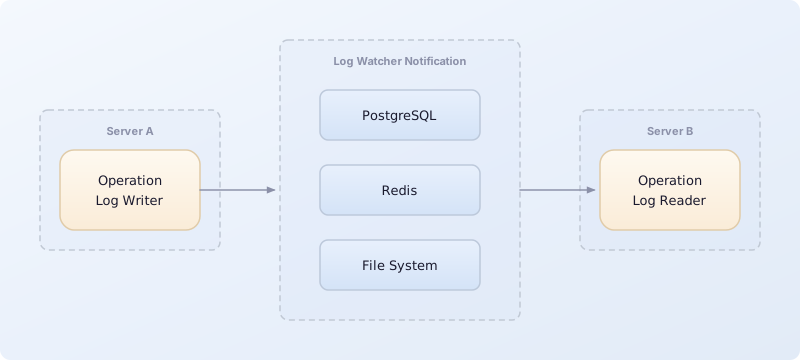
Available Watchers
| Watcher | Package | Notification Method | Best For |
|---|---|---|---|
NpgsqlDbLogWatcher | ActualLab.Fusion.EntityFramework.Npgsql | PostgreSQL NOTIFY/LISTEN | PostgreSQL deployments |
RedisDbLogWatcher | ActualLab.Fusion.EntityFramework.Redis | Redis Pub/Sub | Any deployment with Redis |
FileSystemDbLogWatcher | ActualLab.Fusion.EntityFramework | File system watcher | Single machine, development |
FakeDbLogWatcher | ActualLab.Fusion.EntityFramework | None (polling only) | Default fallback |
LocalDbLogWatcher | ActualLab.Fusion.EntityFramework | In-process only | Single host, events |
PostgreSQL Watcher (Recommended for PostgreSQL)
Uses PostgreSQL's built-in NOTIFY/LISTEN mechanism for instant notifications.
Setup
cs
services.AddDbContextServices<AppDbContext>(db => {
    db.AddOperations(operations => {
        operations.AddNpgsqlOperationLogWatcher();
    });
});
Configuration
cs
operations.AddNpgsqlOperationLogWatcher(_ => new() {
    ChannelNameFormatter = (shard, entryType) =>
        $"myapp_{entryType.Name}{(DbShard.IsSingle(shard) ? "" : $"_{shard}")}",
    TrackerRetryDelays = RetryDelaySeq.Exp(1, 10),
});
Options Reference
| Option | Type | Default | Description |
|---|---|---|---|
ChannelNameFormatter | Func<string, Type, string> | DefaultChannelNameFormatter | Formats NOTIFY channel names |
TrackerRetryDelays | RetryDelaySeq | Exp(1s, 10×) | Retry delays for connection failures |
How It Works
- Each host opens a persistent connection with
LISTEN channel_name - When an operation is committed, the writing host executes
NOTIFY channel_name, 'host_id' - All listening hosts receive the notification immediately
- Each host checks if the notification is from itself (same
host_id) and ignores it if so - Other hosts wake up their operation log reader to process new operations
Channel Naming
Default channel name format: {DbContextName}_{EntryType}{_Shard}
Examples:
AppDbContext_DbOperation(no sharding)AppDbContext_DbOperation_shard-1(with sharding)AppDbContext_DbEvent(event log)
SQL Generated
sql
-- Sender
NOTIFY AppDbContext_DbOperation, 'host-abc123';

-- Receivers
LISTEN AppDbContext_DbOperation;
Benefits
- Instant notifications: No polling delay
- Efficient: Uses existing database connection infrastructure
- Self-filtering: Hosts ignore their own notifications
- No additional infrastructure: Built into PostgreSQL
Limitations
- Only works with PostgreSQL (obviously)
- Requires persistent connection per notification channel
- Notifications are dropped if no listeners are connected
Redis Watcher
Uses Redis Pub/Sub for instant notifications. Works with any database type.
Setup
cs
services.AddDbContextServices<AppDbContext>(db => {
    // First, configure Redis connection
    db.AddRedisDb("localhost:6379", "MyApp");

    db.AddOperations(operations => {
        operations.AddRedisOperationLogWatcher();
    });
});
Configuration
cs
operations.AddRedisOperationLogWatcher(_ => new() {
    PubSubKeyFormatter = (shard, entryType) =>
        $"myapp.{entryType.Name}{(DbShard.IsSingle(shard) ? "" : $".{shard}")}",
    WatchRetryDelays = RetryDelaySeq.Exp(1, 10),
});
Options Reference
| Option | Type | Default | Description |
|---|---|---|---|
PubSubKeyFormatter | Func<string, Type, string> | DefaultPubSubKeyFormatter | Formats Redis channel names |
WatchRetryDelays | RetryDelaySeq | Exp(1s, 10×) | Retry delays for connection failures |
How It Works
- Each host subscribes to a Redis channel
- When an operation is committed, the writing host publishes to the channel
- All subscribed hosts receive the notification immediately
- Hosts wake up their operation log reader
Channel Naming
Default channel name format: {DbContextName}.{EntryType}{.Shard}
Examples:
AppDbContext.DbOperation(no sharding)AppDbContext.DbOperation.shard-1(with sharding)
Benefits
- Database-agnostic: Works with any database
- Instant notifications: Sub-millisecond delivery
- Scalable: Redis handles high message volumes efficiently
- Infrastructure reuse: Many apps already have Redis
Limitations
- Requires Redis infrastructure
- Additional network hop for notifications
- Messages lost if subscriber disconnected during publish
File System Watcher
Uses file system change notifications for cross-process communication on a single machine.
Setup
cs
services.AddDbContextServices<AppDbContext>(db => {
    db.AddOperations(operations => {
        operations.AddFileSystemOperationLogWatcher();
    });
});
Configuration
cs
operations.AddFileSystemOperationLogWatcher(_ => new() {
    FilePathFormatter = (shard, entryType) =>
        Path.Combine(
            Path.GetTempPath(),
            $"myapp_{entryType.Name}{(DbShard.IsSingle(shard) ? "" : $"_{shard}")}.tracker"),
});
Options Reference
| Option | Type | Default | Description |
|---|---|---|---|
FilePathFormatter | Func<string, Type, FilePath> | DefaultFilePathFormatter | Formats tracker file paths |
How It Works
- A tracker file is created in the temp directory
- When an operation is committed, the file's last write time is updated ("touched")
FileSystemWatcheron other processes detects the change- Other processes wake up their operation log reader
Default File Path
{TempPath}/hashed-{dbContext}_{entryType}{_shard}.trackerExample: /tmp/hashed-AppDbContext_DbOperation.tracker
Benefits
- No infrastructure required: Works out of the box
- Simple setup: No configuration needed
- Good for development: Easy debugging
Limitations
- Single machine only: File system isn't shared across network
- Less reliable: File system events can be dropped under load
- Not for containers: Docker containers have isolated file systems
- Temp directory cleanup: Some systems clean temp directories
When to Use
- Local development
- Single-server deployments
- Testing environments
Fake Watcher (Default)
The default watcher when none is explicitly configured. Provides graceful degradation by relying on polling only.
Behavior
- Logs a warning on creation
NotifyChangeddoes nothingWhenChangednever completes
When It's Used
When you don't configure any watcher:
cs
// When you don't configure any watcher:
db.AddOperations(operations => {
    // No AddXxxOperationLogWatcher call
    // FakeDbLogWatcher is used automatically
});
Impact
Operations are still processed correctly, but with polling delays:
- Default
CheckPeriodis 5 seconds - Other hosts see invalidations up to 5 seconds late
Warning Message
[WRN] FakeDbLogWatcher: No real log watcher configured. Using polling only.Local Watcher
An in-process-only watcher. Used internally for event log notifications.
Behavior
NotifyChanged: Notifies waiting tasks in the same processWhenChanged: Waits for in-process notifications only- No cross-process or cross-host communication
When It's Used
By default for DbEvent log:
- Events don't need cross-host notification
- Each host processes events independently from the database
- Polling is sufficient for event processing
Why Events Use Local Watcher
Unlike operations (which need cross-host invalidation), events are:
- Processed by any available host (not specifically the originating one)
- Not replicated across hosts
- Designed for asynchronous background processing
The local watcher ensures the event log reader wakes up after local events are written, while relying on polling for events from other hosts.
Choosing a Watcher
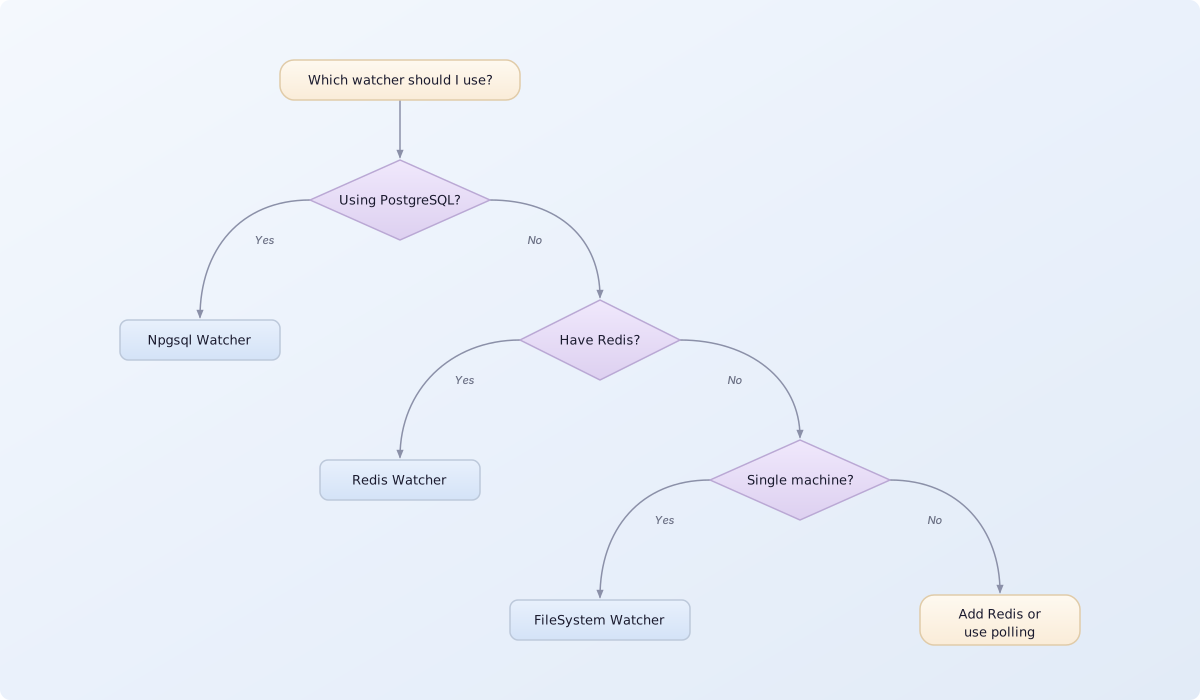
Recommendation Summary
| Scenario | Recommended Watcher |
|---|---|
| PostgreSQL database | NpgsqlDbLogWatcher |
| Any DB + Redis available | RedisDbLogWatcher |
| Single machine deployment | FileSystemDbLogWatcher |
| Development/testing | FileSystemDbLogWatcher |
| No infrastructure available | None (polling fallback) |
Multiple Watchers
You can only have one watcher per log type (operations, events). The last one configured wins:
cs
db.AddOperations(operations => {
    operations.AddFileSystemOperationLogWatcher();  // Overwritten
    operations.AddNpgsqlOperationLogWatcher();       // This one is used
});
Custom Watcher Implementation
You can implement your own watcher for other message brokers:
cs
// You can implement your own watcher for other message brokers.
// For example, a Kafka-based watcher:
public class KafkaDbLogWatcher<TDbContext, TDbEntry>(IServiceProvider services)
    : DbLogWatcher<TDbContext, TDbEntry>(services)
    where TDbContext : DbContext
{
    // Implement CreateShardWatcher to produce per-shard watchers
    // that publish/subscribe via Kafka.
    protected override DbShardWatcher CreateShardWatcher(string shard)
        => throw new NotImplementedException();
}
See the PostgreSQL watcher source for a reference implementation (~200 lines of code).
Monitoring and Debugging
Check Watcher Registration
cs
var watcher = services.GetService<IDbLogWatcher<AppDbContext, DbOperation>>();
Console.WriteLine(watcher?.GetType().Name ?? "No watcher registered");
Enable Tracing
cs
operations.ConfigureOperationLogReader(_ => new() {
    IsTracingEnabled = true,  // Enables Activity tracing
});
Log Levels
Watch for these log messages:
[INF] DbOperationLogReader: Processing X operations[WRN] FakeDbLogWatcher: No real log watcher configured[ERR] NpgsqlDbLogWatcher: Connection lost, reconnecting...