
Appearance
Operations Framework: Reprocessing
Operation Reprocessing automatically retries commands that fail with transient errors. This is essential for handling temporary failures like:
- Database connection issues
- Deadlocks
- Network timeouts
- Concurrent modification conflicts
Enabling Reprocessing
cs
var fusion = services.AddFusion();
fusion.AddOperationReprocessor();  // Enable operation reprocessing
How It Works
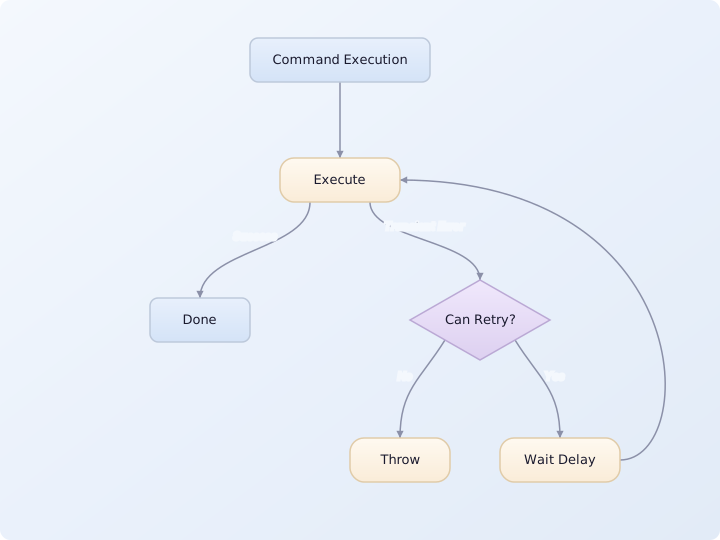
- Command execution starts
- If a transient error occurs,
OperationReprocessorcatches it - Checks if retry is allowed (filter, retry count, error type)
- If allowed, waits for delay and retries the command
- Repeats until success or max retries exceeded
Configuration Options
cs
fusion.AddOperationReprocessor(_ => new() {
    MaxRetryCount = 3,  // Default: 3
    RetryDelays = RetryDelaySeq.Exp(0.50, 3, 0.33),  // Exponential backoff
    Filter = (command, context) => true,  // custom filter
});
Options Reference
| Option | Type | Default | Description |
|---|---|---|---|
MaxRetryCount | int | 3 | Maximum retry attempts |
RetryDelays | RetryDelaySeq | Exp(0.50, 3, 0.33) | Delay sequence between retries |
DelayClock | MomentClock? | null | Custom clock for delays |
Filter | Func<ICommand, CommandContext, bool> | DefaultFilter | Custom retry filter |
Retry Delays
The default retry delays use exponential backoff:
cs
// RetryDelaySeq.Exp(0.50, 3, 0.33)
// Base: 0.5 seconds
// Max multiplier: 3x
// Jitter: ±33%
//
// Produces delays approximately:
// Retry 1: ~0.5s (0.33s - 0.67s)
// Retry 2: ~1.65s (1.1s - 2.2s)
// Retry 3: ~5.45s (3.6s - 7.3s)
var delays = RetryDelaySeq.Exp(0.50, 3, 0.33);
_ = delays;
Default Filter
The default filter determines which commands can be retried:
cs
public static bool DefaultFilter(ICommand command, CommandContext context)
{
    // Only on server
    if (!RuntimeInfo.IsServer)
        return false;

    // Skip delegating commands (proxies)
    if (command is IDelegatingCommand)
        return false;

    // Skip scoped Commander commands (UI commands)
    if (context.Commander.Services.IsScoped())
        return false;

    // Only root-level commands
    return true;
}
Filtering Conditions
A command is eligible for reprocessing when all of these are true.
Pipeline preconditions (checked by OperationReprocessor.OnCommand before the filter runs):
- It is the outermost command (
context.IsOutermost) — nested commands are not retried - It is not an
ISystemCommand - No
Operationhas started yet (context.TryGetOperation() is null) - No
Invalidationis active - The error is classified as transient and the retry count hasn't exceeded
MaxRetryCount
Default filter conditions (OperationReprocessor.Options.DefaultFilter):
- Running on the server (
RuntimeInfo.IsServer) - Not an
IDelegatingCommand(proxy/delegating commands are skipped) - Not running from a scoped
Commanderinstance (i.e., not a UI command)
Transient Error Detection
The reprocessor uses TransiencyResolver<IOperationReprocessor> to classify errors. See Transiency documentation for details on how exception classification works.
| Error Type | Transiency |
|---|---|
ITransientException | Transient |
DbUpdateConcurrencyException | Transient |
SocketException | Transient |
TimeoutException | Transient |
| Other exceptions | Non-transient (no retry) |
Super-Transient Errors
Some errors are classified as super-transient, meaning they can retry indefinitely (ignoring MaxRetryCount):
cs
// Super-transient errors retry without limit
if (transiency == Transiency.SuperTransient)
    return true;  // Always retry
This is useful for errors like:
- Connection pool exhausted (will resolve when connections free up)
- Service temporarily unavailable
Custom Transiency Detection
Register custom error classifiers:
cs
// Register: services.AddSingleton<TransiencyResolver<IOperationReprocessor>>(
//     _ => MyTransiencyResolver.Resolve);
public static class MyTransiencyResolver
{
    public static Transiency Resolve(Exception error)
    {
        if (error is MyCustomRetryableException)
            return Transiency.Transient;

        if (error is MyRateLimitException)
            return Transiency.SuperTransient;  // Retry indefinitely

        return Transiency.Unknown;  // Fall through to other resolvers
    }
}
Context Reset on Retry
When a command is retried, the execution context is reset:
- New
CommandContextcreated - Previous
Operationdiscarded Itemscollections cleared- New execution ID assigned
This ensures each retry attempt starts fresh.
Logging
Reprocessing logs warnings for retries:
[WRN] OperationReprocessor: Reprocessing MyCommand after 500ms delay (attempt 1/3)Best Practices
- Keep commands idempotent – Retries may execute the same logic multiple times
- Use appropriate retry counts – Too many retries delay failure reporting
- Consider error types – Not all errors should be retried
- Log retry context – Include relevant information for debugging
- Set reasonable delays – Give systems time to recover
Example: Custom Retry Policy
cs
fusion.AddOperationReprocessor(_ => new() {
    MaxRetryCount = 5,
    RetryDelays = RetryDelaySeq.Exp(
        TimeSpan.FromSeconds(1),     // Base delay
        TimeSpan.FromSeconds(30)),   // Max delay
    Filter = (command, context) => {
        // Don't retry admin commands
        if (command is IAdminCommand)
            return false;

        // Don't retry commands from specific users
        if (command is IUserCommand userCmd && userCmd.UserId == SpecialUsers.SpecialUserId)
            return false;

        return OperationReprocessor.Options.DefaultFilter(command, context);
    },
});