QuickStart: Learn 80% of Fusion by walking through HelloCart sample
This part is an attempt to introduce all key Fusion features in a single document. If you find it doesn't do its job well, please don't hesitate to reach Alex Y. on Fusion Place and tell him everything 😈
The content below implies you can browse, build, and run HelloCart Sample, so before you start reading further, it's highly recommended to:
- Clone github.com/ActualLab/Fusion.Samples
- Open
HelloCart/HelloCart.csprojin your favorite IDE.
What is HelloCart sample?
It's a small console app designed to show how to implement a simple Fusion API by starting from a toy version of it and gradually transition to its production-ready version that uses EF Core, can be called remotely, and scales horizontally relying on multi-host invalidation.
The API it implements is defined in Abstractions.cs.
There are two immutable model types:
public partial record Product(
    [property: DataMember] string Id,
    [property: DataMember] decimal Price
) : IHasId<string>;

public partial record Cart(
    [property: DataMember] string Id
) : IHasId<string>
{
    [DataMember]
    public ImmutableDictionary<string, decimal> Items { get; init; } = ImmutableDictionary<string, decimal>.Empty;
}
I use records and IHasId<string> here solely because it's a good idea to show all the constraints explicitly in your APIs. But Fusion doesn't really care about either, so both things are totally optional.
We're also going to implement two services:
public interface IProductService: IComputeService
{
    [ComputeMethod]
    public Task<Product?> Get(string id, CancellationToken cancellationToken = default);
    [CommandHandler]
    public Task Edit(EditCommand<Product> command, CancellationToken cancellationToken = default);
}

public interface ICartService: IComputeService
{
    [ComputeMethod]
    public Task<Cart?> Get(string id, CancellationToken cancellationToken = default);
    [ComputeMethod]
    public Task<decimal> GetTotal(string id, CancellationToken cancellationToken = default);
    [CommandHandler]
    public Task Edit(EditCommand<Cart> command, CancellationToken cancellationToken = default);
}
If we ignore [CommandHandler] and [ComputeMethod] for now, it's a tiny CRUD CQRS-style API, where EditCommand<T> is used to implement creation, update, and deletion (it's a demo project, so a single command is used here mainly to save some amount of code):
public partial record EditCommand<TValue>(
    [property: DataMember] string Id,
    [property: DataMember] TValue? Item
) : ICommand<Unit>
    where TValue : class, IHasId<string>
{
    public EditCommand(TValue value) : this(value.Id, value) { }
}
How are we going to use Fusion here?
Imagine we build a UI. Our UI code runs on the client (think Blazor WebAssembly), and for simplicity, we care just about a single thing: the total cost of items in user's cart. We want to update this cost in real-time once anything impacting it changes.
This is why ICartService.GetTotal exists – this method is expected to return the right total. But... Looks like there is nothing in our API that could tell the client that total for the specific cart changes, right?
The right answer to this question is "Wrong! It's a Fusion API, and every read endpoint of a Fusion API is capable of doing exactly this!". But before we dig into the details, let's think how we'd implement the same behavior without Fusion.
One possible option is:
- Add SignalR hub on server
- Make it broadcast every command to every client
- Make clients to maintain their own copies of their carts by "watching" for
EditCommand<Product>andEditCommand<Cart>and update cart's content and total.
Note that point #3 already implies that you have to add a fair amount of code on the client side:
- A very minimal implementation should at least discard the commands that aren't related to the cart you're watching. Remember, server broadcasts every command, so the client may see
EditCommand("apple"), but aProductwithId == "apple"might not exist in the user's cart on this client, right? - Once the client recognizes above command as "relevant", it should somehow update the cart. One option is to update it right on the client, but it requires us to have a separate version of cart update logic running on the client, which isn't perfect from DRY standpoint.
- So if you're a big fan of DRY & minimalism, you might prefer to request a new cart directly from server once you see a command impacting it. On a downside, it will definitely increase the load on server – fetching the cart requires fetching its items, products, etc... So you almost certainly need to cache carts there.
And that's just the beginning of our problems – the implementation described above:
Allows everyone to watch everyone else's purchases. This might be fine in some countries, but... Most of these countries are still living in pre-internet age, so it's a fictional scenario even there.
But even taking ethics and security aside, retransmitting every command to every client means you'll see
O(ClientCount^2)packet rate on server, which consequently means this implementation also won't scale. You absolutely need to filter commands on the server side just because of this.Ok, we need to filter our commands on the server side. Let's add an extra logic to
Edit<Product>handler that finds every cart this product is added to and notifies every customer watching these carts.Here you realize you need a pub-sub to implement this – i.e. your clients will have to subscribe to and unsubscribe from topics like
"cart-[cartId]"to watch for... Wait, are we still going to sendEdit<Product>commands to these topics, or we better go with a separate model for these notifications? And if yes – we'll definitely need a separate logic to process these...What if your client temporarily loses its connection to server? Remember that it needs to know precise cart content to properly update it on every command or change notification. So you need a logic that will refresh the cart once reconnection happens, right?
Most of real-time messaging APIs don't provide strong guarantees for message ordering – especially for messages sent to different topics / channels, and any real real-time app uses a number of such channels. Moreover, if you send requests via regular HTTP API to the same server, the order of these responses and the order of messages you get via SignalR can differ from their order on server side. In other words, you might receive
EditCommand("apple", 5)message first (which sets "apple" price to 5), and after that get the "current" cart content, which is already an outdated now – you requested it few second ago due to reconnect, and this request was completed by server before processingEditCommand("apple", 5)command, but the message describing this command somehow got to the client faster. In other words, you need to take a number of extra steps to ensure the state exposed by your client is still eventually consistent (i.e. eventually the client will display the right cart content and the right total)."Real real-time app" also means you'll have multiple servers. Usually each client talks with just one of them, but changes may happen on any other, so your servers need to somehow announce these changes to their peers. And if you think how to implement this, you'll quickly conclude that you need one more flavor of the same protocol, but now for cross-server change announcements, and moreover, these servers have to implement reactions to these events too!
That's not the full list, but the gist is: as usual, the problem is much more complex than it initially seems. And even if we leave all the technical difficulties aside, the straightforward implementation of such an architecture makes you to violate DRY and SRP multiple times.
If you're not convinced yet that all if this doesn't look good, check out my other post covering another similar scenario: "How Similar Is Fusion to SignalR?"
Can we do better than that?
Yes, and that's exactly what I'm going to talk about further. But first, let's launch HelloCart and see what it does. And make sure UseAutoRunner is disabled in AppSettings.cs.
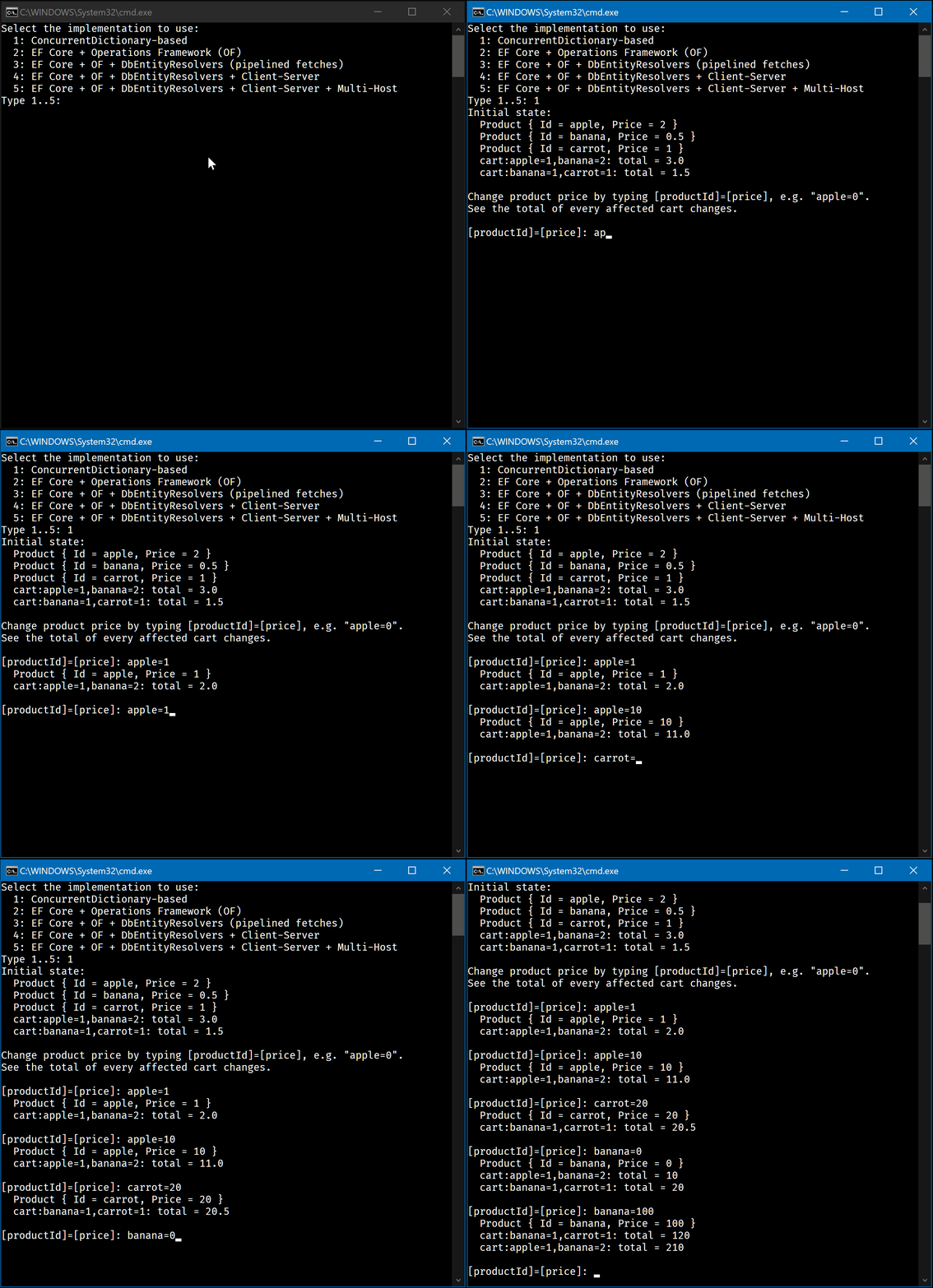
Once you select the API implementation, the sample uses it to create 3 products and 2 carts, AppBase.cs:
public virtual async Task InitializeAsync(IServiceProvider services, bool startHostedServices)
{
    var pApple = new Product("apple", 2);
    var pBanana = new Product("banana", 0.5M);
    var pCarrot = new Product("carrot", 1);
    var cart1 = new Cart("cart1(apple=1,banana=2)") {
        Items = ImmutableDictionary<string, decimal>.Empty
            .Add(pApple.Id, 1)
            .Add(pBanana.Id, 2)
    };
    var cart2 = new Cart("cart2(banana=1,carrot=1)") {
        Items = ImmutableDictionary<string, decimal>.Empty
            .Add(pBanana.Id, 1)
            .Add(pCarrot.Id, 1)
    };
    var extraProducts = Enumerable.Range(0, ExtraProductCount)
        .Select(i => new Product($"product{i + 1}", i));
    ExistingProducts = [pApple, pBanana, pCarrot, ..extraProducts];
    ExistingCarts = [cart1, cart2];

    // if (MustRecreateDb) ...

    if (startHostedServices)
        await services.HostedServices().Start();
}
Then it creates a set of background tasks watching for changes made to every one of them:
public Task Watch(IServiceProvider services, CancellationToken cancellationToken = default)
{
    var tasks = new List<Task>();
    foreach (var product in ExistingProducts)
        tasks.Add(WatchProduct(services, product.Id, cancellationToken));
    foreach (var cart in ExistingCarts)
        tasks.Add(WatchCartTotal(services, cart.Id, cancellationToken));
    return Task.WhenAll(tasks);
}

public async Task WatchCartTotal(
    IServiceProvider services, string cartId, CancellationToken cancellationToken = default)
{
    var cartService = services.GetRequiredService<ICartService>();
    var computed = await Computed.Capture(() => cartService.GetTotal(cartId, cancellationToken), cancellationToken);
    while (true) {
        WriteLine($"  {cartId}: total = {computed.Value}");
        await computed.WhenInvalidated(cancellationToken);
        computed = await computed.Update(cancellationToken);
    }
}

public async Task WatchProduct(
    IServiceProvider services, string productId, CancellationToken cancellationToken = default)
{
    var productService = services.GetRequiredService<IProductService>();
    // The rest is similar to the same code in WatchCartTotal
}
Let's postpone the discussion of above code for now. The only remark I want to make at this point is that Watch is started in fire-and-forgot fashion in Program.cs.
Finally, the looped section in Program.cs starts to ask you to enter [productId]=[price] expression, parses it, and sends the following command:
var command = new EditCommand<Product>(product with { Price = price });
await app.ClientServices.Commander().Call(command);
As you see, this call triggers not only the "watcher" task for the product you change, but surprisingly, for cart's total as well😲
And it happens not just for a single cart, but for any cart that contains the product you modify – try typing banana=100 expression ("banana" is contained in both carts) to see both carts' totals are updated!
Wait, but why this is such a big deal?
We've just shown there is a way to propagate any changes made to a relatively small component to a derivative that uses this component. And further I'll show this is done completely automatically – except a relatively small part.
So... We have a tool allowing us to recompute any derivative as reaction to change in any other piece of data it uses. And this is almost all you need to build the real-time UI, because any UI model can be this derivative as well!
Now let's learn how it works by starting from the very basic implementation (v1) of IProductService and ICartService.
Version 1: ConcurrentDictionary-based implementation
Code: src/HelloCart/v1
☝ This is the most complex, but also the most important part of this document, because it explains nearly all key abstractions. Please be patient and read it carefully 🙏
First, check out InMemoryProductService there. You might notice just a few unusual things there:
- All of its API methods (declared in
IProductService) are marked asvirtual Editcontains a bit unusual piece of code:csif (Invalidation.IsActive) { // Invalidation logic _ = Get(productId, default); return Task.CompletedTask; }
Everything else looks absolutely normal.
The same is equally applicable to InMemoryCartService:
- All of its API methods (declared in
ICartService) are marked asvirtual Editcontains a bit unusual piece of code:csif (Invalidation.IsActive) { _ = Get(cartId, default); return Task.CompletedTask; }
Finally, let's look at the code that registers these services in IoC container, AppV1.cs:
public class AppV1 : AppBase
{
public AppV1()
{
var services = new ServiceCollection();
AppLogging.Configure(services);
services.AddFusion(fusion => {
fusion.AddService<IProductService, InMemoryProductService>();
fusion.AddService<ICartService, InMemoryCartService>();
});
ClientServices = ServerServices = services.BuildServiceProvider();
}
}One thing is clear now: this is the code that adds a magical ingredient to a pretty usual dish to give it superpowers. Sorry, can't resist to depict it in symbols: 🧝=🥣+🦄
Seriously, so how does it work?
AddService registers so-called Compute Service – a singleton, which proxy type is generated in the runtime, but derives from the type you provide, i.e. InMemoryProductService / InMemoryCartService in above case. The proxy "decorates" every method marked by [ComputeMethod] with a special wrapper:
First, it computes the
keyfor this call. It is ~(serviceInstance, method, arguments.ExceptCancellationToken())tuple.Then it checks if the
IComputedinstance associated with the same key still exists in RAM.ComputedRegistryis the underlying type that caches weak references to all ofIComputedinstances and helps to find them. IfIComputedinstance is found and it's stillConsistent, the wrapper "strips" it by returning itsValue– in other words, it returns the cached answer. Note thatValuemay throw an exception – as you might guess, exceptions are cached the same way as well, though by default they auto-expire in 1 second.Otherwise it acquires async lock for the
keyand retries #2 inside this lock. You probably recognize this is just a double-checked locking.If all of this didn't help to find the cached "answer", the base method (i.e. your original one) is called to compute it. But before the computation part start, the
IComputedinstance that's going to store its outcome gets temporarily exposed viaComputed.GetCurrent()for the duration of the computation.Why? Well, it wasn't mentioned, but once an
IComputedgets "stripped" on step #2, #3, and even later on #4, it's also registered as a dependency of any otherIComputedthat's currently exposed viaComputed.GetCurrent(). And this is howIComputedinstances "learn" all the components they're "built" from.When the computation completes, the newly created
IComputedgets registered inComputedRegistryand "stripped" the same way to return itsValueand possibly, become a dependency of anotherIComputed.
The gist is: any Compute Service methods marked by [ComputeMethod] attribute get a special behavior, which:
- Caches method call results
- Makes sure that for a given set of arguments just one computation of call result may run concurrently (due to async lock inside)
- Finally, it builds a dependency graph of method computation results under the hood, where nodes are
IComputedinstances, and edges are stored in their_usedand_usedByfields.
And even though normally you don't see these IComputed instances, there are APIs allowing you to:
- "Pull" the
IComputedthat "backs" certain[ComputeMethod]call result - Invalidate it, i.e. mark it inconsistent
- Await for its invalidation
- Or even get the most up-to-date version of a possibly invalidated
IComputed– either a cached or a newly computed one.
Do you remember the code "watching" for cart changes in the beginning? AppBase.cs:
// Computed.Capture pulls the `IComputed` storing the
// result of a call to the first [ComputeMethod] made from
// the delegate it gets, i.e. the result of
// cartService.GetTotal(cartId, ct) in this case
var computed = await Computed.Capture(
ct => cartService.GetTotal(cartId, ct), cancellationToken);
while (true) {
WriteLine($" {cartId}: total = {computed.Value}");
// IComputed.WhenInvalidated awaits for the invalidation.
// It returns immediately if
// (computed.State == ConsistencyState.Invalidated)
await computed.WhenInvalidated(cancellationToken);
// Finally, this is how you update IComputed instances.
// As you might notice, they're almost immutable,
// so "update" always means creation of a new instance.
computed = await computed.Update(false, cancellationToken);
}Now, how these dependencies get created? Let's look at InMemoryCartService.GetTotal again:
public virtual async Task<decimal> GetTotal(
string id, CancellationToken cancellationToken = default)
{
// Dependency: this.Get(id)!
var cart = await Get(id, cancellationToken);
if (cart is null)
return 0;
var total = 0M;
foreach (var (productId, quantity) in cart.Items) {
// Dependency: _products.Get(productId)!
var product = await _products.Get(productId, cancellationToken);
total += (product?.Price ?? 0M) * quantity;
}
return total;
}As you see, any result of GetTotal(id) becomes dependent on:
- Cart content – for the cart with this
id - Every product that's referenced by items in this cart.
If you want to learn more about Compute Services and
IComputed, check out Part 1 and Part 2 of this Tutorial later.
Now it's time to demystify how Get(productId) call result gets invalidated once a product with productId gets changed.
Again, remember this code? InMemoryProductService.cs:
public virtual Task Edit(EditCommand<Product> command, CancellationToken cancellationToken = default)
{
var (productId, product) = command;
if (string.IsNullOrEmpty(productId))
throw new ArgumentOutOfRangeException(nameof(command));
if (Invalidation.IsActive) {
// This is the invalidation block.
// Every [ComputeMethod] result you "touch" here
// instantly becomes a 🎃 (gets invalidated)!
_ = Get(productId, default);
return Task.CompletedTask;
}
if (product is null)
_products.Remove(productId, out _);
else
_products[productId] = product;
return Task.CompletedTask;
}And if you look into similar Edit for in InMemoryCartService.cs, you'll find a very similar block there:
if (Invalidation.IsActive) {
    _ = Get(cartId, default);
    return Task.CompletedTask;
}So now you have almost the full picture:
- Low-level methods (the ones that don't have any dependencies) are invalidated explicitly – by the invalidation blocks in command handlers that may render cached results of calls to such methods inconsistent with the ground truth.
- High-level methods like
GetTotalare invalidated automatically due to invalidation of their dependencies. This is why you don't see a call toGetTotalin any of invalidation blocks.
What's missing is how it happens that when you call Edit, *both if (Invalidation.IsActive) { ... } and the code outside of this block runs, assuming this block contains return statement?
I'll give a brief answer here:
- Yes, in reality any Compute Service method decorated with
[CommandHandler]is calledN + 1times, whereNis the number of servers in your cluster 🙀 - The first call is the normal one – it makes all the changes
Nmore calls are made inside so-called invalidation scope – i.e. insideusing (Invalidation.Begin()) { ... }block, and they are reliably executed on every server in your cluster, including the one where the command was originally executed.- Moreover, when your command (the
Task<T>running it) completes on the original server, it's guaranteed that both its normal handler call and "the invalidation call" were completed for it locally.
Under the hood all of this is powered by similar AOP-style decorators and CommandR – a MediatR – style abstraction used by Fusion to implement its command processing pipeline.
Methods marked with [CommandHandler] behave very differently from methods marked by [ComputeMethod] – in fact, there is nothing common at all. The wrapper logic for command handlers does nothing but routes every call to ICommander. This allows you to call such methods directly – note that if this logic won't exist, calling such a method directly would be a mistake, because such call won't trigger the whole command processing pipeline for the used command.
So wrappers for [CommandHandler]-s declared in Compute Services exist to unify this: you are free to invoke such commands by either throwing them to ICommander.Call(command, ...), or just calling them directly. Later you'll learn that this feature also enables Fusion to implement clients for APIs like ICartService, and to route client-side commands (sent to client-side ICommander instances) to these clients to execute them on server side.
Ok, but what happens when the command is processed by ICommander? As in case with MediatR, it means triggering command handler pipeline for this type of command. Fusion injects a number of its own middleware-like handlers for Compute Service commands. These handlers run your command handler (the final one) in the end, but also provide all the infrastructure needed to "replay" this command in the invalidation mode on every host. In particular, they:
- Provide an abstraction allowing to start a transaction for this command and get
DbContexts associated with this transaction. - Log the command to the operation log on commit
- Notify other hosts that operation log was updated
- Replay the command in the invalidation mode locally.
Btw, "replaying the command in the invalidation mode" means:
- Restoring the "operation items". Later I'll show you can pass the information from a "normal" command handler "pass" to the subsequent "invalidation pass" run. Typically you need this to properly invalidate something related to what was deleted during the "normal" pass.
- Running the same command handler, but inside
using (Invalidation.Begin()) { ... }block.
☝ The pipeline described above is called "Operations Framework" (OF further) – in fact, it's just a set of handlers and services for CommandR providing this multi-host invalidation pipeline for every Fusion's Compute Service.
And a few final remarks on this:
- The pipeline described above is used very partially in
v1's case: there are no other hosts, no database, and thus no calls enabling all these integrations were made when the IoC container was configured. So only a very core part of this pipeline running handlers normally + in the invalidation mode is used. - No, this is not how Fusion delivers changes to every remote client (e.g. Blazor WASM running in your browser). This pipeline is server-side only.
If you want to learn all the details about this – check out Part 8, Part 9, and Part 10 of the Tutorial 😎
Version 2: Switching to EF Core
Code: src/HelloCart/v2
☝ We will move WAY FASTER now – this and every following version will require just about 5 minutes of your time.
Here is the actual code inside AppV2 constructor:
// This is exactly the same Compute Service registration code you saw earlier
services.AddFusion(fusion => {
    fusion.AddService<IProductService, DbProductService>();
    fusion.AddService<ICartService, DbCartService>();
});
The AppDb.Configure (AppDb.cs) method sets up the database-related services. Here's what it does.
Adds a pooled IDbContextFactory<AppDbContext> for efficient database access.
services.AddPooledDbContextFactory<AppDbContext>(db => {
    if (AppSettings.Db.UsePostgreSql) { /* PostgreSQL setup */ }
    else { /* SQLite setup */ }
    db.EnableSensitiveDataLogging();
});
Configures additional services for Entity Framework integration, including operations framework for multi-host invalidation.
services.AddDbContextServices<AppDbContext>(db => {
    db.AddOperations(operations => {
        if (!AppSettings.Db.UseOperationLogWatchers)
            return;

        if (AppSettings.Db.UseRedisOperationLogWatchers) {
            db.AddRedisDb("localhost", "Fusion.Samples.HelloCart");
            operations.AddRedisOperationLogWatcher();
        }
        else if (AppSettings.Db.UsePostgreSql)
            operations.AddNpgsqlOperationLogWatcher();
        else
            operations.AddFileSystemOperationLogWatcher();
    });
    db.AddEntityResolver<string, DbProduct>();
    db.AddEntityResolver<string, DbCart>(_ => new() {
        // Cart is always loaded together with items
        QueryTransformer = carts => carts.Include(c => c.Items),
    });
});
Operation Reprocessor is optional, it enables reprocessing of operations for reliability.
if (AppSettings.Db.UseOperationReprocessor)
    services.AddFusion().AddOperationReprocessor();
AppV2.InitializeAsync from (AppBase.cs) simply re-created the DB:
await using var dbContext = ServerServices.GetRequiredService<IDbContextFactory<AppDbContext>>().CreateDbContext();
await dbContext.Database.EnsureDeletedAsync();
await dbContext.Database.EnsureCreatedAsync();
Now, if you look at DbProductService and DbCartService, you'll notice just a few differences between them and any regular service that reads/writes the DB:
They are inherited from
DbServiceBase<AppDbContext>. This type is just a convenience helper providing a few protected methods for services that are supposed to access the DB.One of these methods is
CreateDbContext– you may see it's typically used like this:csawait using var dbContext = await DbHub.CreateDbContext(cancellationToken); // ... code using dbContextBy default,
CreateDbContextreturns a read-onlyDbContextwith change tracking disabled. As you might guess, this method of gettingDbContextis supposed to be used in[ComputeMethod]-s, i.e. query-style methods that aren't supposed to change anything or rely on change tracking."Read-only" means this
DbContext"throws" on attempt to callSaveChangesAsync.And another one is
CreateOperationDbContext, which is used like this:csawait using var dbContext = await DbHub.CreateOperationDbContext(cancellationToken); // ... code using dbContextContrary to the previous method, this method is used to create
DbContextinside command handlers, and once it's called, it also starts the transaction associated with the current command (which is why this method returnsTask<TDbContext>). The transaction is auto-committed once your handler completes normally (i.e. w/o an exception), moreover, the operation log entry describing the current command will be persisted as part of this transaction.As you might guess, the
DbContextprovided by this method is read-write and with enabled change tracking. Moreover, if you call it multiple times, you'll get differentDbContext-s, but all of them will share the sameDbConnection, and consequently, will "see" the DB through the same transaction.
And that's it. So to use Fusion with EF, you must:
- Make a couple extra calls during IoC container configuration to enable Operations Framework
- Inherit your Compute Services from
DbServiceBase<TDbContext>and rely on itsCreateDbContext/CreateOperationDbContextto getDbContext-s. Alternatively, you just see what these methods do and use the same code in Compute Services that can't be inherited fromDbServiceBase<TDbContext>.
Version 3: Production-grade EF Core code
Code: src/HelloCart/v3
The v2 code is actually already good enough, but one small improvement can make it way better, AppDb.cs:
db.AddEntityResolver<string, DbProduct>();
db.AddEntityResolver<string, DbCart>((_, options) => {
    // Cart is always loaded together with items
    options.QueryTransformer = carts => carts.Include(c => c.Items);
});
This code registers two entity resolvers – one for DbProduct type, and another one – for DbCart type (string is the type of key of these entities).
Entity resolvers are helpers grouping multiple requests to find the entity by its key together and resolving all of them by sending a single DB query.
The pseudo-code of the "main loop" of every entity resolver looks ~ as follows:
while (NotDisposed()) {
    var (tasks, keys) = GetNewEntityResolutionRequestTasks();
    // GetEntitiesAsync sends a single DB query with "{key} in (...)" clause
    var entities = await GetEntities(keys); ..)
    CompleteEntityResolutionTasks(tasks, keys, entities);
}
Here is an example of how to use such resolvers, DbProductServiceUsingEntityResolver.cs:
public virtual async Task<Product?> Get(string id, CancellationToken cancellationToken = default)
{
    var dbProduct = await ProductResolver.Get(id, cancellationToken);
    return dbProduct is null
        ? null
        : new Product(dbProduct.Id, dbProduct.Price);
}
Guess why this important? Look at the production-grade GetTotal code, DbCartServiceUsingEntityResolver.cs:
public virtual async Task<decimal> GetTotal(string id, CancellationToken cancellationToken = default)
{
    var cart = await Get(id, cancellationToken);
    if (cart is null)
        return 0;

    var itemTotals = await Task.WhenAll(cart.Items.Select(async item => {
        var product = await Products.Get(item.Key, cancellationToken);
        return item.Value * (product?.Price ?? 0M);
    }));

    return itemTotals.Sum();
}
Contrary to the previous version, it fetches all the products in parallel. But why?
- First, it "hopes" that Fusion will resolve most of
Getcalls via itsIComputedinstance cache, i.e. without hitting the DB. And why shouldn't it try to do this in parallel, if this possible? - But now imagine the case when Fusion's cache is empty, or it doesn't store the result of
Getfor every product that's in the cart. This is where entity resolver used inGetkicks in: most likely it will run just 1 or 2 queries to resolve every remaining product thatGetTotalthrows – and moreover, since all these calls "flow" throughGet, these results will be cached in Fusion's cache too!
So crafting highly efficient Compute Services based on EF Core is actually quite easy – if you think what's the extra code you have to write, you'll find it's mainly if (Invalidation.IsActive) { ... } blocks – the rest is something you'd likely have otherwise at some point as well!
And if you're curious how much of this "extra" a real app is expected to have – check out Board Games. It's mentioned in its README.md that this whole app has just about 35 extra lines of code responsible for the invalidation! In other words, Fusion brought the cost of all real-time features this app has to nearly zero there.
Version 4: Distributed Reactive Computing
Code: src/HelloCart/v4
So far we've learned how to build a version of our API that works locally. What does it take to convert it to a remotely callable one?
Actually, almost nothing! Here is AppV4 constructor:
var uri = "http://localhost:7005";

// Create server
App = CreateWebApp(uri);
ServerServices = App.Services;

// Create client
ClientServices = BuildClientServices(uri);
So this version of app:
- Builds a web host & exposes server-side API there
- Builds
ClientServiceshitting this webhost - And if you check out how
ClientServicesare used, you'll find that:Program.csuses them to update productsWatchServices=ClientServicesby default, so all the watcher tasks are using them too.
Can you spot any difference when you run the app in this mode? You can't 🙀 Update delays is the only difference you might measure, but they're still extremely tiny, because both the server and the client share the same machine.
All of this means that Fusion is capable of providing a client for any Compute Service that mimics its behavior completely, including everything related to invalidation and dependency tracking.
Such clients are called Compute Service Clients. They are Compute Services too – you can even cast them to IComputeService as any other compute service. But:
- They're auto-generated
- The computation they run is always a web API call to the remote controller that exposes corresponding Compute Service.
- The invalidation of values they "compute" happens because any web API call they make bears the information about the server-side "publication" of the underlying
IComputed. And once thisIComputedgets invalidated on server side, the client gets a message notifying it about the invalidation via dedicated WebSocket channel. - Updates are normally happen via the same WebSocket channel as well, so only the first call to some
(service, method, args)is sent via HTTP. The reason? ASP.NET Core provides a robust argument binding & validation pipeline, and currently Fusion relies on it to make sure the client calls only what's explicitly allowed to call, and sends only what's ok to deserialize on server side. So once the first call passes through, every further update of the same result can be requested via WebSocket channel. As you might guess, the arguments aren't sent in this case – client usespublicationIdit got from server earlier to reference theIComputedthat has to be updated.
This is a very basic description of how it works. So let's see what do we need to publish Compute Service first. We'll start from Host container configuration of AppV4.cs:
services.AddFusion(RpcServiceMode.Server, fusion => {
    fusion.AddWebServer();
    fusion.AddService<IProductService, DbProductServiceUsingEntityResolver>();
    fusion.AddService<ICartService, DbCartServiceUsingEntityResolver>();
});
Let's look at web app configuration now:
app.Urls.Add(baseUri);
app.UseFusionSession();
app.UseWebSockets(new WebSocketOptions() {
    KeepAliveInterval = TimeSpan.FromSeconds(30),
});
app.MapRpcWebSocketServer();
Let's switch to the client side code now. The client-side container uses the following configuration:
services.AddFusion(fusion => {
    fusion.Rpc.AddWebSocketClient(baseUri);
    fusion.AddClient<IProductService>();
    fusion.AddClient<ICartService>();
});
Where can you use such clients? Actually, everywhere!
- In Blazor WebAssembly – obvously
- In console or MAUI apps
- Finally, even on the server-side – nothing prevents you to e.g. aggregate the data on a dedicated set of servers there, but keep the results of aggregation similarly reactive to the changes in underlying data.
So welcome to Distributed Reactive Computing!
Version 5: Multi-host Scenario
Code: src/HelloCart/v5
You already know that Fusion is capable to "propagate" the invalidations to every host sharing the same data.
Let's see what's necessary to make it work. This is our full AppV5 – there is nothing else:
public class AppV5 : AppV4
{
    public WebApplication ExtraApp { get; }
    // We'll modify the data on AppHost & watch it changes on App
    public override IServiceProvider WatchedServices => ServerServices;

    public AppV5()
    {
        // Server 1
        App = CreateWebApp("http://localhost:7005");
        ServerServices = App.Services;

        // Server 2
        var extraAppUri = "http://localhost:7006";
        ExtraApp = CreateWebApp(extraAppUri);

        // Client
        ClientServices = BuildClientServices(extraAppUri);
    }

    public override async Task InitializeAsync(IServiceProvider services, bool startHostedServices)
    {
        await base.InitializeAsync(services, false);
        if (startHostedServices) {
            await App.StartAsync();
            await ExtraApp.StartAsync();
            await Task.Delay(100);
        }
    }

    public override async ValueTask DisposeAsync()
    {
        if (ClientServices is IAsyncDisposable csd)
            await csd.DisposeAsync();

        await ExtraApp.StopAsync();
        await ExtraApp.DisposeAsync();

        await App.StopAsync();
        await App.DisposeAsync();
    }
}
So we create an extra host here, but both hosts use the same container configuration we started to use in v2. In other words, no extra is needed to use multi-host invalidation – v2 configuration is already tuned for it.
And if you run this app, it will:
- Use
Host.Servicesto watch & display the changes - Use the client connecting to
ExtraHostto make the changes.
So if you see it reacts to some change, it means that both Compute Service client and multi-host invalidation works. And they really do!
And congrats – this is the end of this part, and now you know almost everything! The parts we didn't touch at all are:
- Part 3: IState<T> and Its Flavors. The key abstraction it describes is
ComputedState<T>– the type that implements "wait for change, make a delay, recompute" loop similar to the one we manually coded here, but in more robust and convenient way. - Part 6: Real-time UI in Blazor Apps – you'll learn how
ComputedState<T>is used byLiveComponent<T>to power real-time updates in Blazor. - Part 5: Fusion on Server-Side Only – read it to fully understand how Fusion actually caches
IComputedinstances, and what are the levers you can use to tweak its caching behavior.