Part 9: CommandR
ActualLab.CommandR is MediatR-like library helping to implement CQRS-style command handlers. Together with a set of other abstractions it enables you to get the pipeline described in the previous section with almost no extra code.
This part of the tutorial will cover CommandR itself. The next one will show how to use it together with other Fusion services to implement a robust CQRS pipeline.
Even though CommandR solves the same problem as MediatR, it offers a few new features:
- Unified handler pipeline. Any CommandR handler can act either as a filter (~ middleware-like handler) or as the final one. MediatR supports pipeline behaviors, which are similar to filtering handlers in CommandR, but they are the same for all commands. And this feature is actually quite useful – e.g. built-in filter for
IPreparedCommandhelps to unify validation. CommandContext– anHttpContext-like type helping to non-handler code to store and access the state associated with the currently running command. Even though command contexts can be nested (commands may invoke other commands), the whole hierarchy of them is always available.- Convention-based command handler discovery and invocation. You don't have to implement
ICommandHandler<TCommand, TResult>every time you want to add a handler – any async method tagged with[CommandHandler]and having command as its first parameter, andCancellationTokenas the last one works; all other arguments are resolved via IoC container. - AOP-style command handlers. Such handlers are virtual async methods with two arguments:
(command, cancellationToken). To make AOP part work, the type declaring such handlers must be registered withAddCommandService(...)– an extension method toIServiceCollectionthat registers a runtime-generated proxy instead of the actual implementation type. The proxy ensures any call to such method is still routed viaCommander.Call(command)to invoke the whole pipeline for this command – i.e. all other handlers associated with it. In other words, such handlers can be invoked directly or viaCommander, but the result is always the same.
Since many of you are familiar with MediatR, here is the map of its terms to CommandR terms:
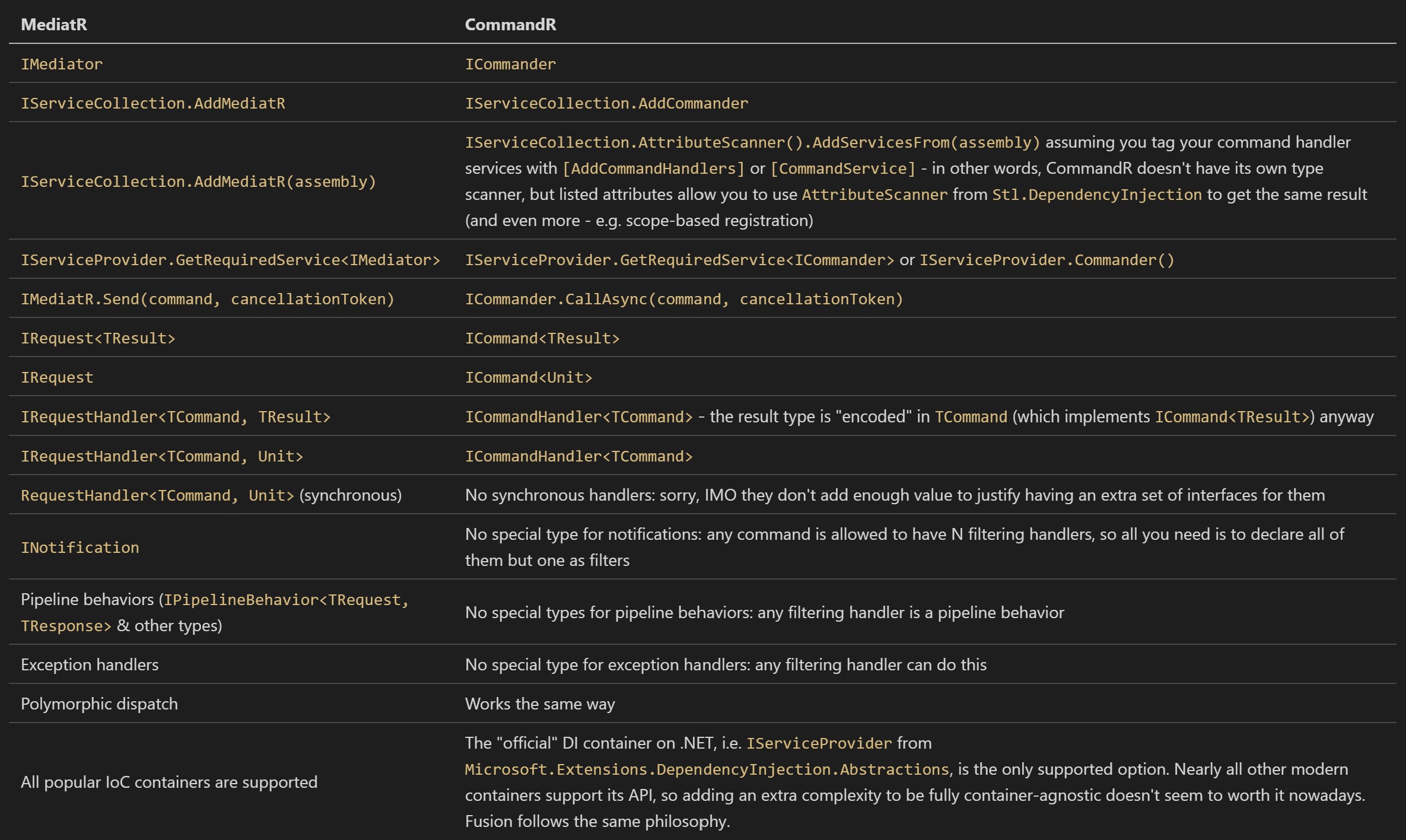
You might notice the API offered by CommandR is somewhat simpler – at least while you don't use some of its unique features mentioned earlier.
Hello, CommandR!
Let's declare our first command and its MediatR-style handler:
public class PrintCommand : ICommand<Unit>
{
    public string Message { get; set; } = "";
}

// Interface-based command handler
public class PrintCommandHandler : ICommandHandler<PrintCommand>, IDisposable
{
    public PrintCommandHandler() => WriteLine("Creating PrintCommandHandler.");
    public void Dispose() => WriteLine("Disposing PrintCommandHandler");

    public async Task OnCommand(PrintCommand command, CommandContext context, CancellationToken cancellationToken)
    {
        WriteLine(command.Message);
        WriteLine("Sir, yes, sir!");
    }
}
Using CommandR and MediatR is quite similar:
// Building IoC container
var serviceBuilder = new ServiceCollection()
    .AddScoped<PrintCommandHandler>(); // Try changing this to AddSingleton
var rpc = serviceBuilder.AddRpc();
var commanderBuilder = serviceBuilder.AddCommander()
    .AddHandlers<PrintCommandHandler>();
var services = serviceBuilder.BuildServiceProvider();

var commander = services.Commander(); // Same as .GetRequiredService<ICommander>()
await commander.Call(new PrintCommand() { Message = "Are you operational?" });
await commander.Call(new PrintCommand() { Message = "Are you operational?" });
The output:
Creating PrintCommandHandler.
Are you operational?
Sir, yes, sir!
Disposing PrintCommandHandler
Creating PrintCommandHandler.
Are you operational?
Sir, yes, sir!
Disposing PrintCommandHandler
Notice that:
- CommandR doesn't auto-register command handler services – it cares only about figuring out how to map commands to command handlers available in these services. That's why you have to register services separately.
Callcreates its ownIServiceScopeto resolve services for every command invocation.
Try changing AddScoped to AddSingleton in above example.
Convention-based handlers, CommandContext, recursion
Let's write a bit more complex handler to see how CommandContext works.
public class RecSumCommand : ICommand<long>
{
    public long[] Numbers { get; set; } = Array.Empty<long>();
}// Building IoC container
var serviceBuilder = new ServiceCollection()
.AddScoped<RecSumCommandHandler>();
var rpc = serviceBuilder.AddRpc();
var commanderBuilder = serviceBuilder.AddCommander()
.AddHandlers<RecSumCommandHandler>();
var services = serviceBuilder.BuildServiceProvider();
var commander = services.Commander(); // Same as .GetRequiredService<ICommander>()
WriteLine(await commander.Call(new RecSumCommand() { Numbers = new [] { 1L, 2, 3 }}));The output:
Creating RecSumCommandHandler.
Numbers: 1, 2, 3
CommandContext stack size: 1
Depth via context.Items: 1
Numbers: 2, 3
CommandContext stack size: 2
Depth via context.Items: 2
Numbers: 3
CommandContext stack size: 3
Depth via context.Items: 3
Numbers:
CommandContext stack size: 4
Depth via context.Items: 4
6
A few things are interesting here:
- You can use convention-based command handlers: all you need is to decorate a method with
[CommandHandler]instead of implementingICommandHandler<TCommand>. - Such handlers are more flexible with the arguments:
- The first argument should always be the command
- The last one should always be the
CancellationToken CommandContextarguments are resolved viaCommandContext.GetCurrent()- Everything else is resolved via
CommandContext.Services, i.e. a scoped service provider.
But the most complex part of this example covers CommandContext. Contexts are "typed" – even though they all are inherited from CommandContext, their actual type is CommandContext<TResult>.
Command context allows to:
- Find currently running command
- Set or read its result. Usually you don't have to set the result manually – the code invoking command handlers ensures the result is set once the "deepest" handler exist, but you may want to read it in some handlers in your pipeline.
- Manage
IServiceScope - Access its
Items. It's anOptionSet, ~ a thread-safe dictionary-like structure helping to store any info associated with the current command.
Finally, CommandContext is a class, but there is also ICommandContext – an internal interface defining its API – check it out. And if you're looking for details, check out CommandContext itself.
So when you call a command, a new CommandContext is created. But what about the service scope? The code from CommandContext<TResult> constructor explains this better than a few sentences:
// PreviousContext here is CommandContext.Current,
// which will be replaced with `this` soon after.
if (PreviousContext?.Commander != commander) {
    OuterContext = null;
    OutermostContext = this;
    ServiceScope = Commander.Services.CreateScope();
    Items = new OptionSet();
}
else {
    OuterContext = PreviousContext;
    OutermostContext = PreviousContext!.OutermostContext;
    ServiceScope = OutermostContext.ServiceScope;
    Items = OutermostContext.Items;
}
As you see, if you "switch" ICommander instances on such calls, the new context behaves like it's a top-level one, i.e. it creates a new service scope, new Items, and exposes itself as OutermostContext.
Now it's a good time to try changing false to true in this fragment above:
var tailSum = await context.Commander.Call(
    new RecSumCommand() { Numbers = tail }, false, // Try changing it to true
    cancellationToken);
Ways To Run A Command
ICommander offers just a single method to run the command, but in reality, it's the most "low-level" option, so you'll rarely need it.
The actual options are implemented in CommanderExt type (Ext is a shortcut for Extensions that's used everywhere in ActualLab projects for such classes).
Callis the one you should normally use. It "invokes" the command and returns its result.Runacts likeCall, but returnsCommandContextinstead. Which is why it doesn't throw an exception even when one of the command handlers does – it completes successfully in any case. You can use e.g.CommandContext.UntypedResultto get the actual command completion result or exception.Startis fire-and-forget way to start a command. Similarly toRun, it returnsCommandContext, but note that it returns this context immediately, i.e. while the command associated with this context is still running. Even thoughCommandContextallows you to know when the command produced its result (via e.g.CommandContext.UntypedResultTask), the result itself doesn't mean the pipeline for this command completed its execution, so code in its handlers might be still running.
All these methods take up to 3 arguments:
ICommand– obviouslybool isolate = false– an optional parameter indicating whether the command should be executed in isolated fashion. If it's true, the command will be executed insideExecutionContext.TrySuppressFlowblock, so it will also be the outermost for sure.CancellationToken cancellationToken = default– a usual argument of almost any async method.
Command Services and filtering handlers
The most interesting way to register command handlers are to declare them inside so-called Command Service:
public class RecSumCommandService : ICommandService
{
    [CommandHandler] // Note that ICommandHandler<RecSumCommand, long> support isn't needed
    public virtual async Task<long> RecSum( // Notice "public virtual"!
        RecSumCommand command,
        // You can't have any extra arguments here
        CancellationToken cancellationToken = default)
    {
        if (command.Numbers.Length == 0)
            return 0;
        var head = command.Numbers[0];
        var tail = command.Numbers[1..];
        var context = CommandContext.GetCurrent();
        var tailSum = await context.Commander.Call( // Note it's a direct call, but the whole pipeline still gets invoked!
            new RecSumCommand() { Numbers = tail },
            cancellationToken);
        return head + tailSum;
    }

    // This handler is associated with ANY command (ICommand)
    // Priority = 10 means it runs earlier than any handler with the default priority 0
    // IsFilter tells it triggers other handlers via InvokeRemainingHandlers
    [CommandHandler(Priority = 10, IsFilter = true)]
    protected virtual async Task DepthTracker(ICommand command, CancellationToken cancellationToken)
    {
        var context = CommandContext.GetCurrent();
        var depth = 1 + (int) (context.Items["Depth"] ?? 0);
        context.Items["Depth"] = depth;
        WriteLine($"Depth via context.Items: {depth}");

        await context.InvokeRemainingHandlers(cancellationToken).ConfigureAwait(false);
    }

    // Another filter for RecSumCommand
    [CommandHandler(Priority = 9, IsFilter = true)]
    protected virtual Task ArgumentWriter(RecSumCommand command, CancellationToken cancellationToken)
    {
        WriteLine($"Numbers: {command.Numbers.ToDelimitedString()}");
        var context = CommandContext.GetCurrent();
        return context.InvokeRemainingHandlers(cancellationToken);
    }
}
Such services has to be registered via AddCommandService method of the CommanderBuilder:
// Building IoC container
var serviceBuilder = new ServiceCollection();
var rpc = serviceBuilder.AddRpc();
var commanderBuilder = serviceBuilder.AddCommander()
    .AddService<RecSumCommandService>(); // Such services are auto-registered as singletons
var services = serviceBuilder.BuildServiceProvider();

var commander = services.Commander();
var recSumService = services.GetRequiredService<RecSumCommandService>();
WriteLine(recSumService.GetType());
WriteLine(await commander.Call(new RecSumCommand() { Numbers = new [] { 1L, 2 }}));
WriteLine(await commander.Call(new RecSumCommand() { Numbers = new [] { 3L, 4 }}));
The output:
Castle.Proxies.RecSumCommandServiceProxy
Depth via context.Items: 1
Numbers: 1, 2
Depth via context.Items: 2
Numbers: 2
Depth via context.Items: 3
Numbers:
3
Depth via context.Items: 1
Numbers: 3, 4
Depth via context.Items: 2
Numbers: 4
Depth via context.Items: 3
Numbers:
7
As you see, the proxy type generated for such services routes every direct invocation of a command handler through ICommander.Call. So contrary to regular handlers, you can invoke such handlers directly – the whole CommandR pipeline gets invoked for them anyway.